Watch an agent use a browser for the first time and it's a small marvel. Watch it do the same thing for the hundredth time and you start to notice what it's paying for. Every screenshot. Every scroll. Every time it works out again where the button was yesterday.
That's the idea behind Proxy, the browser built into Frontier. Your agents can open a page, read it and act on it, like any browser agent. What changes is what happens after the first time. Do a task once while Proxy records, and it becomes a workflow your agents can call by name. The hundredth run doesn't relearn the page. It just runs.
We wanted to know what that's actually worth, so we measured it.
The test. Eight everyday browser jobs, taken from how we use Proxy ourselves: reading today's news on X, pulling stats for a few profiles and then a batch of ten, scanning a profile, reading a thread, scanning the feed, and reading and searching Reddit. Each ran in a fresh Claude Code session on Sonnet 5.5, once with Claude in Chrome and once with Proxy running a saved workflow. Same prompt, same model, nothing posted or liked. Where both could do the job, they came back with the same answers.
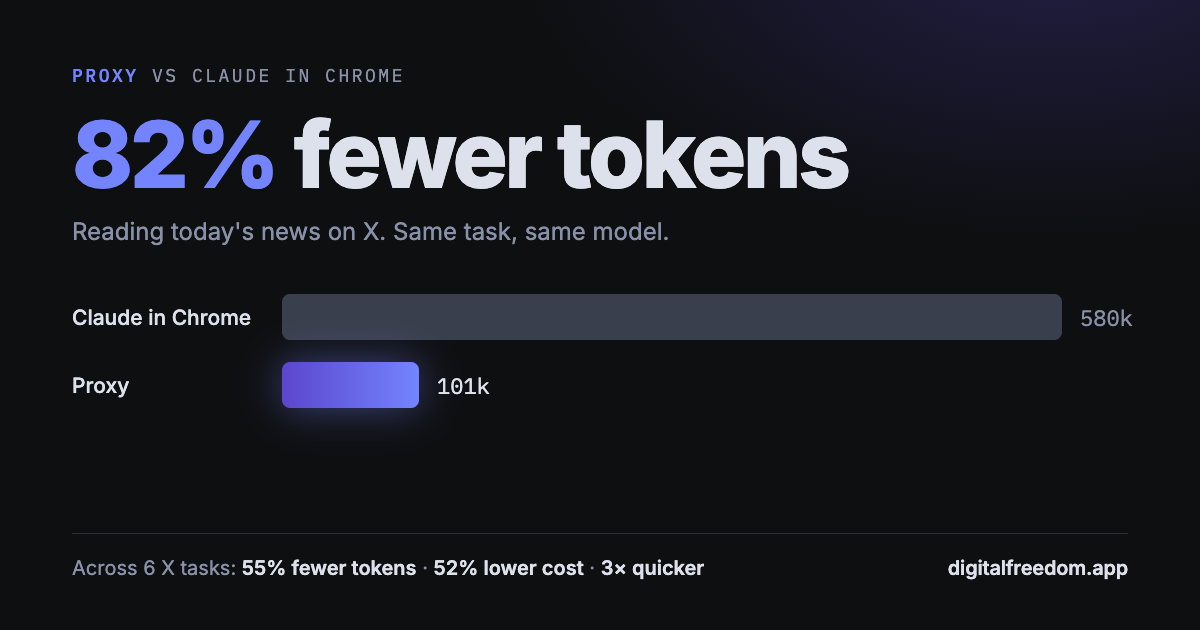
The biggest gap was the news. Claude in Chrome clicked into each topic and looked at the page after every step, about twenty screenshots in all, and used 580,000 input tokens. Proxy ran one workflow and handed back the headlines and posts for 101,000. That's 82% fewer tokens for the same three stories, at under a quarter of the cost.
Batches came next. Checking ten profiles took Proxy one call and 20 seconds. Claude in Chrome visited each page in turn and took 134. Across all six X tasks, Proxy used 55% fewer tokens, cost 52% less, and finished in about a third of the time.
Some jobs weren't close at all. Asked to read a Reddit thread or search Reddit, Claude in Chrome declined, saying the site wasn't allowed. Proxy read both.
Where it's a wash. On a single simple page, like five recent posts or three profile bios, Claude in Chrome held its own. It read the page with a script instead of screenshots and landed within about 20% of Proxy. Exploring a site for the first time, it's a fine way to go. The difference shows up the second time, and the tenth, and the thousandth.
Why it matters more than the number. Tokens are only the visible part. A browser job that costs a quarter as much is one you can run every morning instead of once a week, or across ten accounts instead of one. It's the difference between checking on something and keeping watch over it. Proxy keeps its own signed-in session for each account, so two identities can run side by side. And it lives inside Frontier, so an agent working overnight never needs your Chrome.
How we measured, honestly. One run per task, per browser, on September 30, 2026, so read these as a direction rather than a promise. The Proxy runs still spent part of their budget finding the right workflow before running it. Tell an agent which workflow to use and it gets cheaper still.
Try it. Turn on Proxy in Settings → General → Proxy, and Frontier connects it to Claude Code and Codex for you. The Proxy help article covers the rest. Then pick one thing you check in a browser every day, do it once while Proxy watches, and hand it to an Agent. New to Frontier? Download it here.
Q: Does Proxy use fewer tokens than Claude in Chrome? A: In our tests, yes, most of all on jobs that span several pages. Reading three news topics on X took 82% fewer input tokens with a saved Proxy workflow, and six X tasks together took 55% fewer.
Q: Can Proxy open sites Claude in Chrome won't? A: In our runs, Claude in Chrome declined to open Reddit. Proxy read Reddit threads and search results without trouble.
Q: Do I need Chrome to use Proxy? A: No. Proxy is a browser built into the Frontier desktop app. It can copy your logins over from Chrome for the sites you choose.